
Client Benefits
Use client-specific model access and offers with Codex, Claude Code, and other supported tools
OpenModel gives you one API key for models from multiple providers. Some supported clients, such as Codex and Claude Code, may also receive access to selected models or special prices.
These benefits are automatic when they are available. Configure the client using its OpenModel integration guide, then use it normally.
No separate enrollment
You only need the API key, API address, and model settings described in the integration guide. No extra request parameters are required. You can configure Standard-price fallback separately for each API key.
What you may receive
- Client offers — Selected models may have a lower price when used through a supported client.
- Client-specific availability — Some model access may be offered only through particular supported clients.
- Automatic pricing — When more than one offer applies, OpenModel automatically uses the best price available for that request.
Benefits vary by client and model and may change as model availability changes. Check Model Pricing for current data before starting a large workload.
Published client discounts
Standard-price fallback
When client-preferred routing is temporarily unavailable, OpenModel can either continue the request at standard pricing or stop, based on the current API key:
| Setting | Request result | Price result |
|---|---|---|
| Allow | Continue the request at standard pricing | The client discount does not apply to this request |
| Don't allow | Stop the request when client-preferred routing is unavailable | Avoid continuing at standard pricing without the client discount |
This preference belongs to the API key. Configure Standard-price fallback when creating or editing a key in the Console. New API keys allow fallback by default, and different keys on the same account can use different preferences.

Only applies to this fallback case
This setting does not change ordinary API requests, unrecognized clients, models without client-preferred routing, or requests that strictly pin a route.
Check an offer before use
Open Model Pricing and find the model you want to use. If it currently has a client offer, the list shows the applicable client and advertised discount.
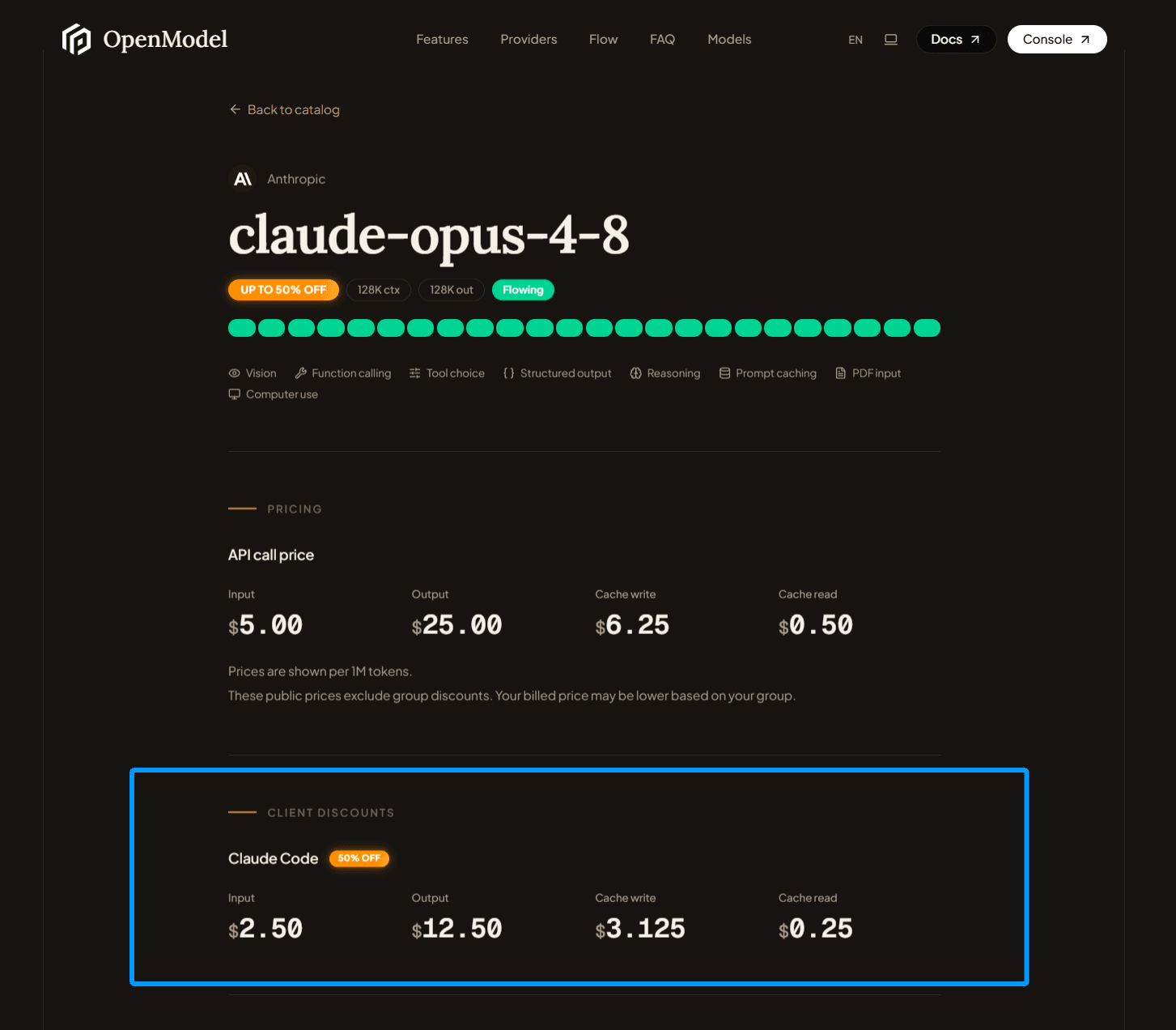
An advertised offer means that a benefit is available for eligible requests. It is not a fixed-price guarantee for every request.
Confirm the price after a request
After sending a request, open Consumption Logs in the Console and find the corresponding record. A client icon in the UA column means the request was recognized as a supported client. Hover over the icon to see the matched client type. A discount badge in the Cost column shows the total discount applied to that request.
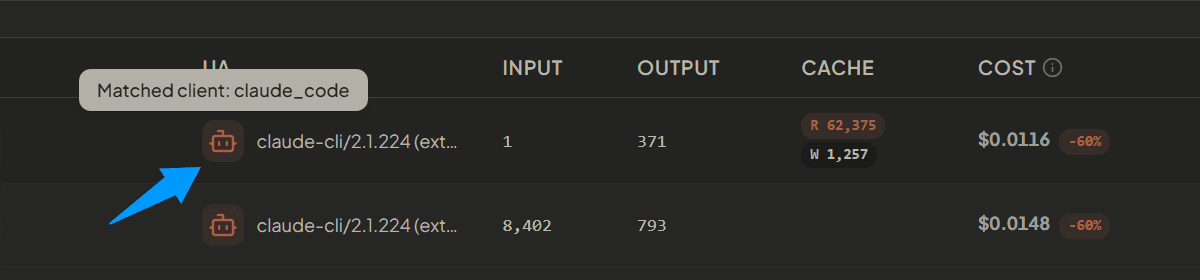
The client icon and hover tooltip identify the matched client; the Cost badge records the total applied discount.
If a client benefit was not available for a particular request, the request may still complete at the standard applicable price. For billing questions, use the consumption log rather than Models & Pricing as the final reference.
Get started
Choose your client and follow its setup guide:
After setup, choose a model from Model Pricing and start using the client as usual. OpenModel applies eligible benefits automatically.
Frequently asked questions
Do I need to enable client benefits?
No. There is no separate switch or application process. Complete the supported client integration and use it normally.
Does allowing Standard-price fallback mean every request uses standard pricing?
No. OpenModel only considers fallback when client-preferred routing exists for the model but is currently unavailable. Available client-preferred routing remains preferred.
Why does Models & Pricing show an offer that is missing from one request?
Models & Pricing shows currently available offers, while the consumption log records the actual result of an individual request. Availability can vary, so always use the log when checking a specific charge.
Can I continue using the API from my own application?
Yes. Custom applications can continue using OpenModel's standard APIs. Client-specific benefits apply only to the supported integrations listed by OpenModel.